2.1-2.2A Technical Drawing (1): Tinkercad
Learning Objectives:
After this lesson, students can
- use some common tools in Tinkercad to draw 3D models;
- understand how to read orthographic projection drawings.
1. TINKERCAD
How to join the class in Tinkercad easily?
Tinkercad accepts Google account single sign-on (SSO). That means you can use your school Google account to sign in Tinkercad.
1. Login to your Google classroom (classroom.google.com) by your school google account.
2. In your D&T Google classroom - Classwork, find the link for joining your Tinkercad class.
3. Click the above link. Then select to use Google account when required.
SELECT THIS :
MAKE SURE THAT YOU ARE USING YOUR OWN ACCOUNT,
BECAUSE SOME ONE MIGHT USE YOUR COMPUTER AND HAVE NOT LOG OUT. IF IT IS NOT YOUR ACCOUNT, LOGOUT FROM TINKERCAD FIRST, THEN GO BACK TO STEP 1.4. Follow the instructions from Autodesk. Done !
Tinkercad Self-directed Lessons
Tinkercad Tutorial Videos
Tinkercad Tutorial Part 1 - (Interface and Movement)
Tinkercad Tutorial Part 2 - (Shape Manipulation and Scaling)
Tinkercad Tutorial Part 3 - (Group, Hole, Align, and Flip Tool)
Tinkercad Tutorial Part 4 - (Workplane, Ruler, Blocks and Bricks)
Tinkercad Tutorial Part 5 - (Circular Patterns and Slicing) (including Duplicate Tool)
Tinkercad Tutorial Part 6 - (Import Export and Collaborating)
Advanced Skill 1: Shape Parameters
Advanced Skill 2: Shape Generator
Example 1
Example 2
Demonstration Examples
Example 1: Snowman
Example 2: Treasure Box
Example 3: Race Car
Example 4: Organic Shapes
2. HOMEWORK
Homework 2.1.1 (10 marks)
Read the following first angle orthographic projections of a component and make this 3D model it in Tinkercad. The dimensions must be strictly followed.
Name of your design in Tinkercad:
HW2.1.1
Estimated Time: 30 minutes
Explanation and demonstration will be given in the class.
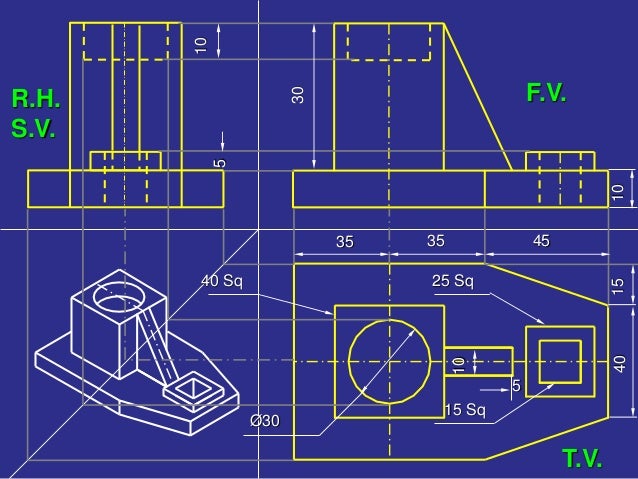
Remark: Some Common Line Types in Engineering Drawings

The following 3D model was made by Sketchup for the demonstration of HW2.1.1 .
Link: https://3dwarehouse.sketchup.com/model/08943dd0-a763-4b66-931d-e7cd234fb22a/HWX11